Pure server-side tracking: a tour of my setup

I skipped web GTM entirely, moved payload building into a Cloudflare Worker, and made GA4 a consumer of my data instead of its source.
If someone had told me 7 years ago what tracking rabbit hole I’d be messing around in today, I wouldn’t have believed them. From the very beginning of my career in digital marketing, I knew one simple rule: if you want Universal Analytics to collect data on a website, install the script. The script… Back then, I had no idea what client-side or server-side meant, and how analytics worked felt like actual magic. But here I am, at the latest stage of tracking evolution, ready to talk about nuances and approaches where simply sticking a script on a website is nowhere near enough.
Although I’ve already set the topic for this article, since it’s my very first blog post, I can’t escape doing a quick intro about myself. I’ve been working as a technical marketer for over seven years. I’ve seen the evolution of web analytics with my own eyes: early attempts to handle raw data in Analytics 360 (for the super rich guys), the first signals of server-side tracking, and the massive shift toward analyzing raw GA4 data thanks to the free BigQuery export. Back then, anything other than client-side tracking looked like actual rocket science to me. Today, in 2026, switching to server-side tracking isn’t an impossible task. A big shout-out to the Stape team as the main evangelists of server-side tracking bow.
Here’s the thing. When Google first released server-side GTM, I thought it was a direct replacement for the traditional web container. Honestly, I’m sure many marketers still think that way. Intuitively, server-side tracking feels like just a direct data exchange between your server and vendors like Google Analytics or Google Ads. But reality is a bit more complex. For data to appear on your server, it first has to “happen” in the user’s browser and only then reach your server.
We are promised faster page load speeds with sGTM by minimizing the amount of tracking JS in the user’s browser. However, vendor pitches delicately skip one detail: you can rarely get rid of browser tracking 100%. You still need something in the browser to collect basic telemetry – without it, some of your data simply never shows up in your analytics.
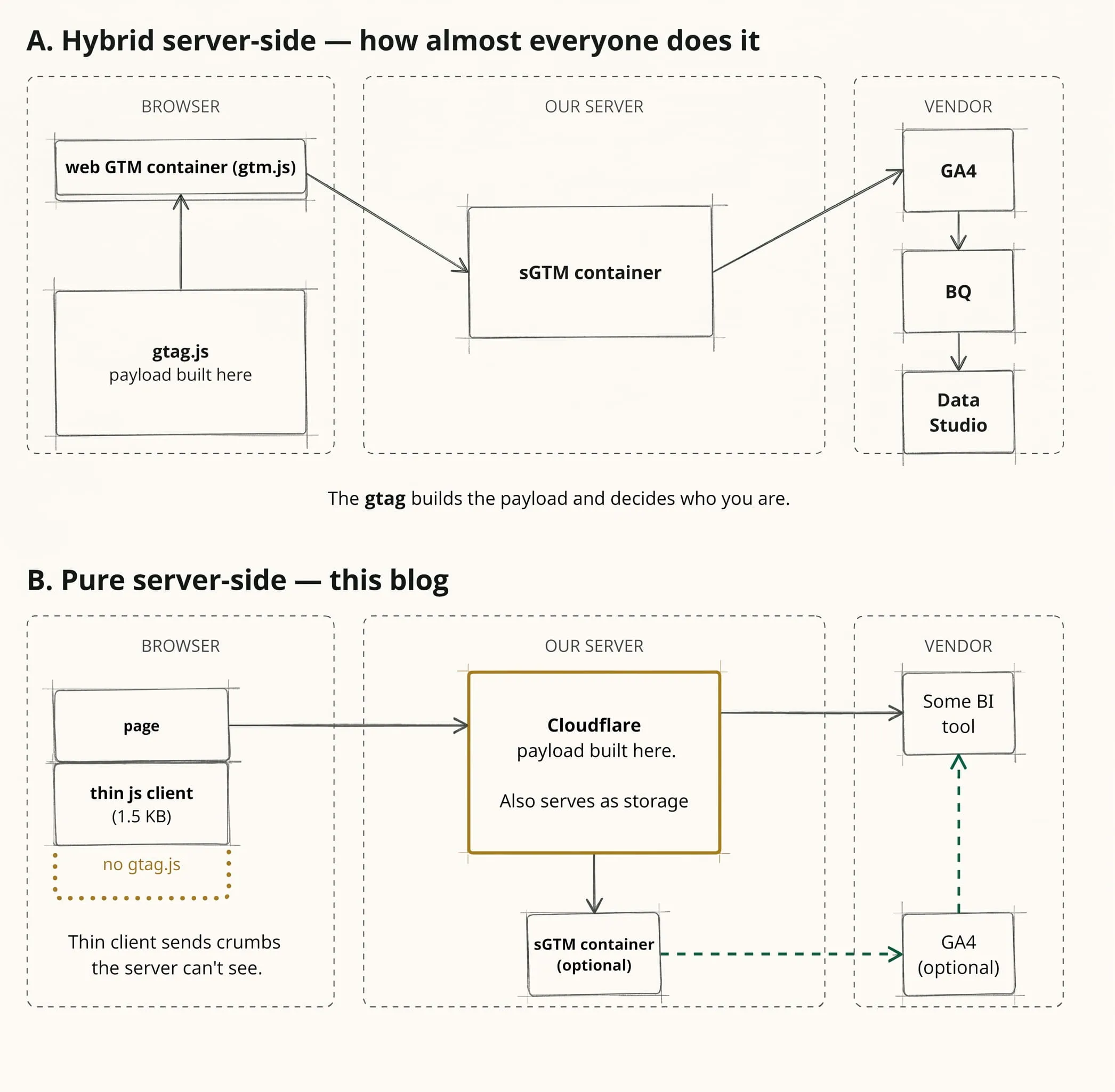
For the last couple of years working heavily with server-side, I had this itch in my brain. I didn’t want to stop at “hybrid” server-side tracking. I wanted to push further and stay ahead of Google, Microsoft, or even Stape. So I started brainstorming: “What if?”
What about Emerald City?
In my “story setting”, Emerald City is my blog. This website is my laboratory – a place where I can run any experiment and test my wildest fantasies. What fantasies, you ask?
- Collecting data and generating payloads on the server instead of the browser
- Alternative raw data streaming instead of native GA4 to BigQuery export
- The next logical step: custom data post-processing (like custom attribution calculations)
- Non-standard data engineering approaches for BigQuery Warehouse
- Custom methods to fight bots
- Treating GA4 as a data consumer, not a data owner
- Smart visualization for this content project (saving this for when there’s actual traffic)
Let’s quickly run through all these points. Rest assured, I’ll write detailed separate articles for each of them in the future.
Stage 1: Hit generation and sending to Stape-based sGTM
To put it simply, in web tracking, a hit is the smallest unit of data – a grain, a single event triggered when a user interacts with a site. In standard client-side or “server-side” tracking (in quotes, because I mean the hybrid kind), these hits are collected in the browser via gtag and sent to vendors (or to a server tag manager for more technical guys).
In my setup, the payload is assembled by a Cloudflare Worker on the server side. It handles user and session identification by setting cookies directly from the server. This payload matches what GA4 sends from a browser almost 1:1, so the native GA4 client in sGTM accepts it seamlessly.
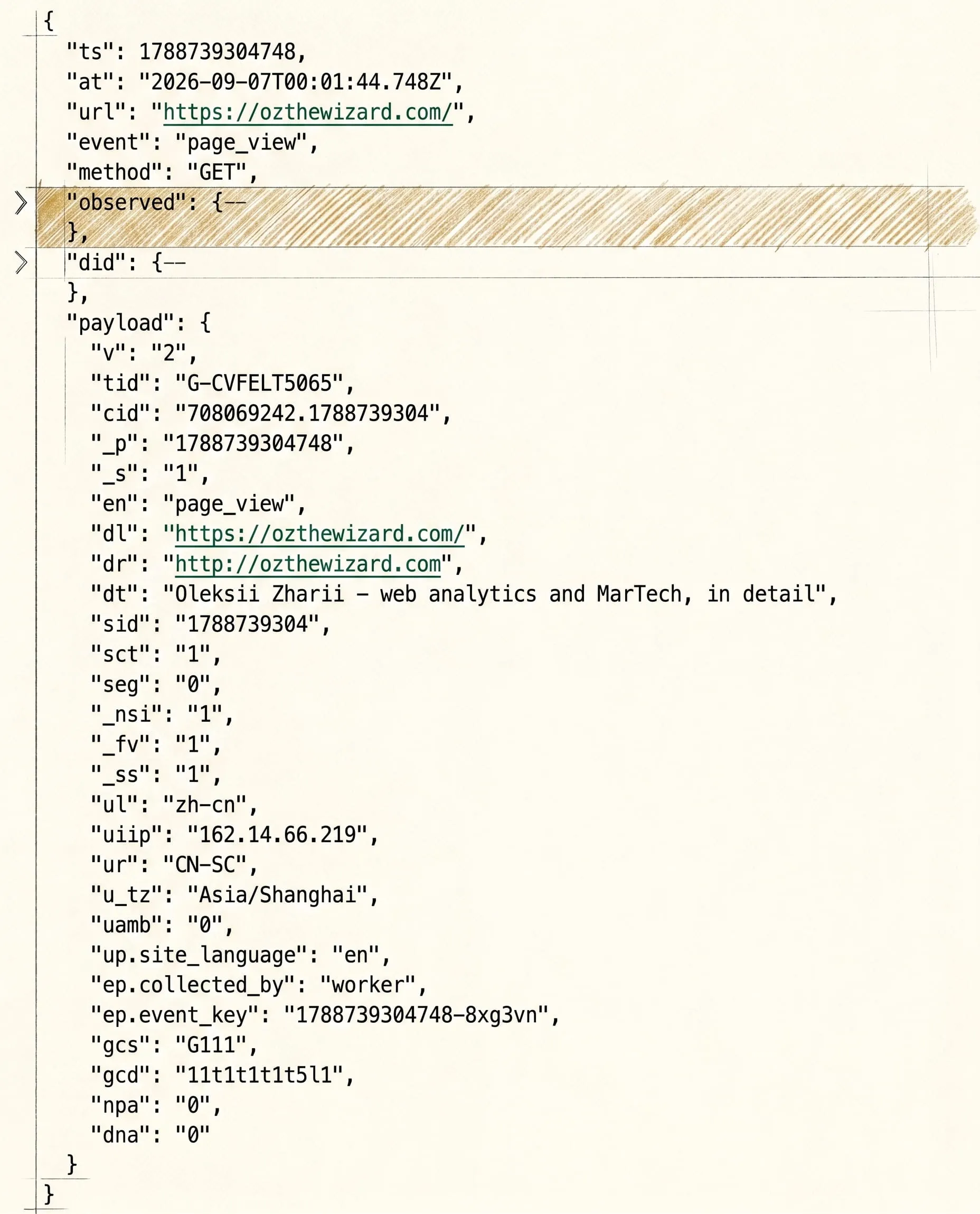
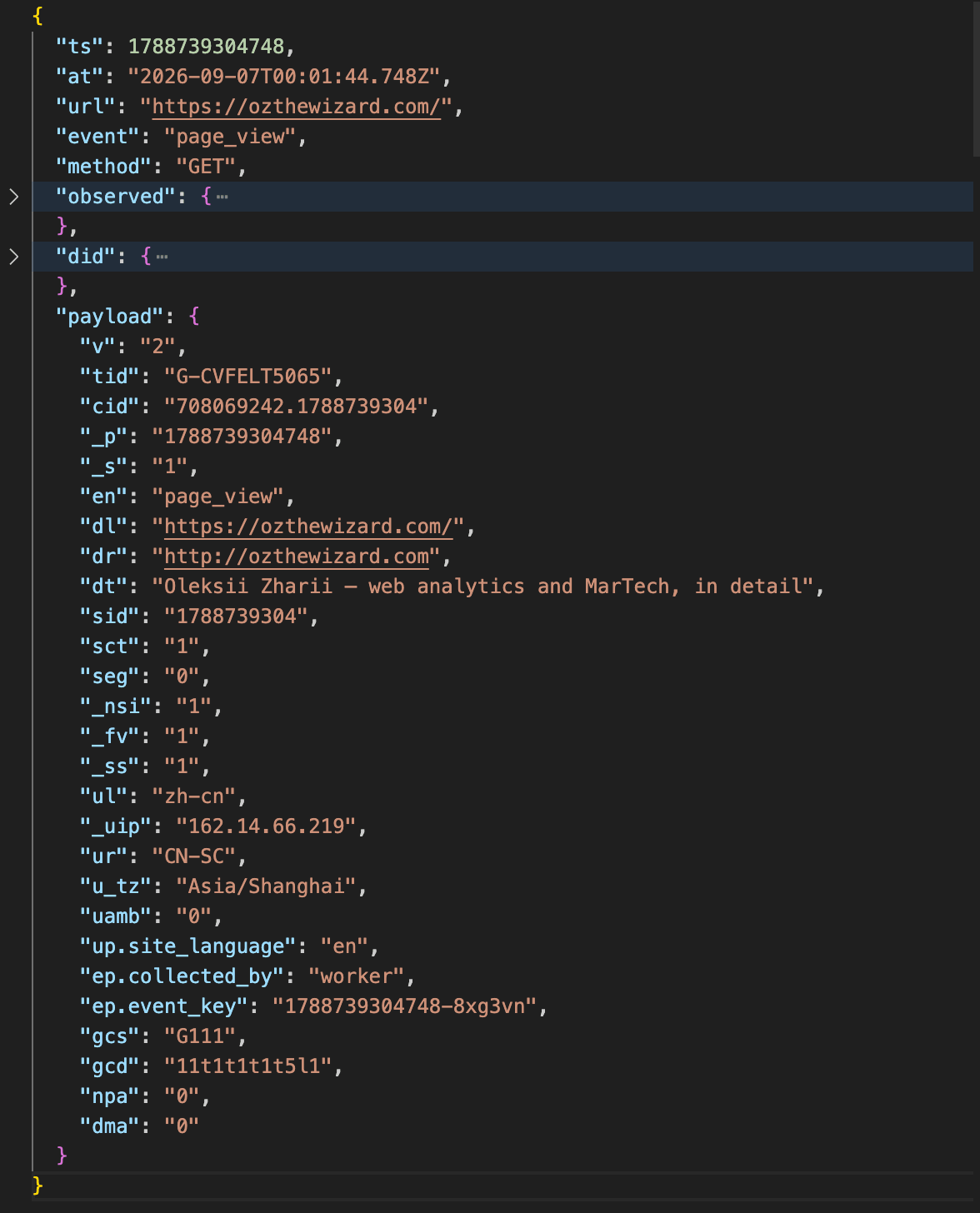
A real page_view payload, exactly as the Worker assembled it.
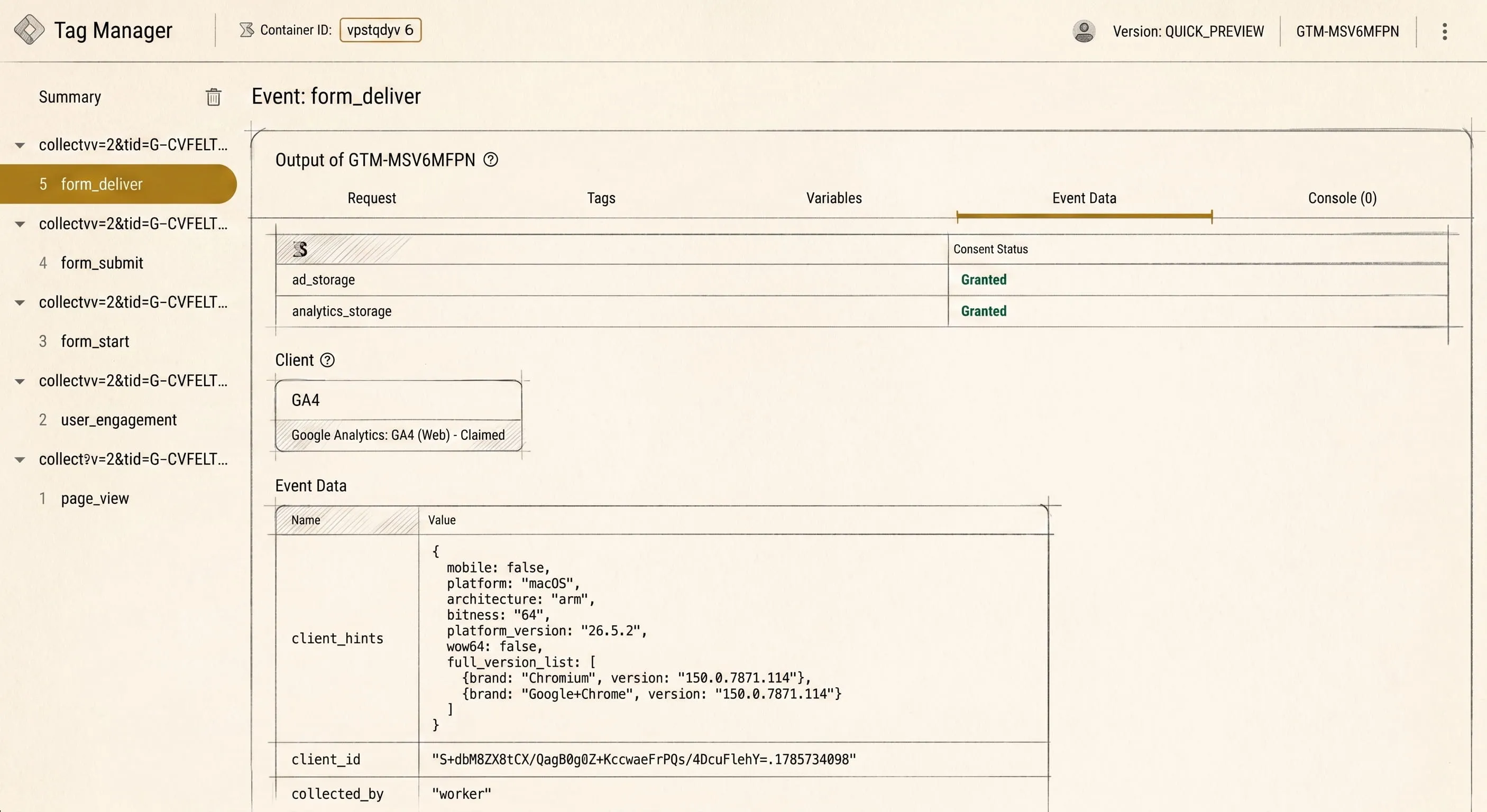
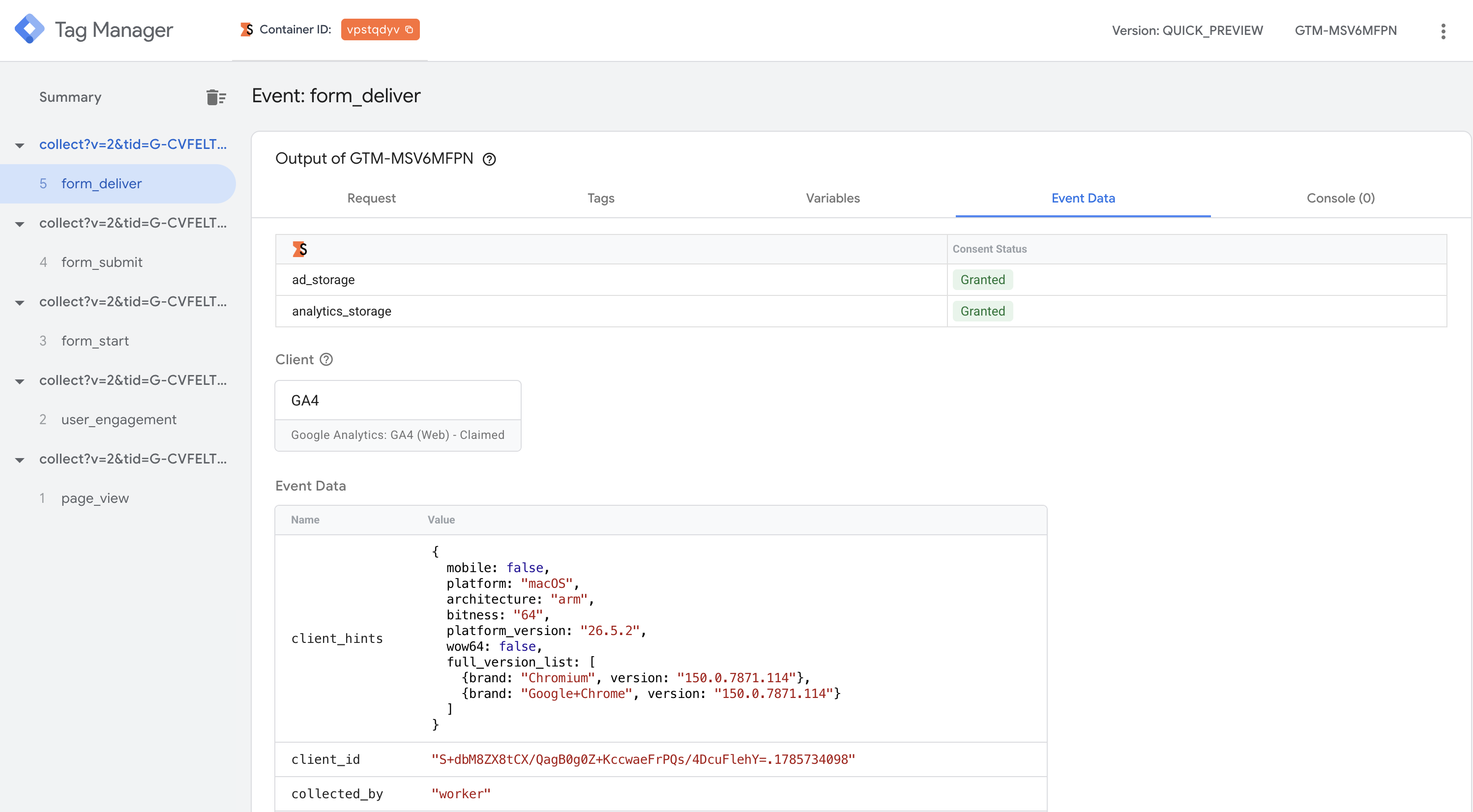
And the same payload arriving in sGTM: the native GA4 client claims it as its own, and collected_by: worker says where it was built.
What happens inside the server container is a big topic for future posts. But at this stage, it handles a few straightforward tasks:
- Claiming incoming GA4 requests
- Parsing data into eventData
- Spreading and forwarding data to vendors
Stage 2: Alternative raw data streaming instead of native GA4 to BigQuery
When transitioning from UA to GA4, everyone complained about the new interface and lost features. But the undeniable killer feature was native, free raw data export to Google BigQuery. That was the moment marketers everywhere started heavily learning SQL, and I slowly started forgetting what the GA4 web UI looks like (I hate it).
The products – businesses, really – I work with have heavy traffic, making aggregated web reports useless (because of sampling). Raw data analysis was our only option. But there are things about native export I really dislike:
- Daily export is capped at 1 million events per day per property.
- Intraday export has no limit, but you have to process the data manually with plenty of quirks.
- If Google experiences glitches during Data API exports, your data is lost forever (if you use only intraday export).
- Data processing between “data hits GA endpoint” and “data lands in BigQuery table” is a total black box.
So, I decided to build my own custom solution. To compare datasets later, every
event will pass a unique event_key. This acts as a bridge between my custom
stream and the native export, allowing me to audit data completeness and
processing rules.
Stage 3: Data post-processing
Since Stage 2 and Stage 3 overlap, I’ve already shared my thoughts on Google’s native processing. Seriously, I remember a community spreadsheet tracking bugs in GA4 raw data exports (found it).
page_locationwould contain agclid, but it wouldn’t populate the dedicated field.google / organicappearing wheregoogle / cpcshould be.- and plenty of other annoying bugs (the full list is in the link above).
It’s embarrassing to tell a manager “that’s just how processing works” when explaining a drop in paid traffic.
I want full control over every step and a say in the data at each one. So the processing rules land on my shoulders too, and they split into these categories:
- Attribution:
source,medium, click IDs, and channel groups are calculated directly frompage_location&page_referrer. - Touchpoints: A logical layer between events and sessions. Simply put, an
external interaction. If a user comes from organic search, leaves, and clicks
an ad, they generate two touchpoints:
google / organicandgoogle / cpc. - Device: Parsing User-Agent strings and working with Client Hints (device, browser, OS).
- GEO & Consent: Processing location data and user consent choices.
- Bot Detection: Evaluating signals to output a clear verdict (bot vs. human).
- Extras: User local time, shared slugs for multilingual pages, etc.
After this step, I end up with a flat table containing 112 fields. Since traffic is still warming up, I let myself go wild (earlier versions had around 140 fields, which felt like overkill).
Stage 4: Diving into Data Engineering
In the past, basic web analytics meant installing GTM, enabling GA4, turning on
BigQuery export, and calling it a day. Now, I’m stepping into data engineering by
building a proper Data Warehouse (DWH) with distinct layers (not to be confused
with the web dataLayer object):
- Layer 0 (Sources): Browser, cookies, request headers.
- Layer 1 (Raw): Storing raw R2 files in Cloudflare (1 file = 1 hit). After 24 hours, daily files are merged into a single one.
- Layer 2 (Staging): Transforming Layer 1 into tabular Parquet files with 1:1 mapping in data.
- Layer 3 (Enriched): Applying the post-processing logic described in Stage 3 (this is where I currently am).
- Layer 4 (Models): Higher-level entity tables above the event level:
touchpoints, sessions, pseudo-IDs / browsers, users, and an
identity_mapfor joins. - Layer 5 (Marts): Aggregated data marts built to answer specific business questions (e.g., article popularity).
I had read about these architectural patterns before, but building every layer step-by-step myself was new. Designing the DWH has been one of my favorite parts of this project so far. While it’s tricky working without live traffic yet, the beauty of this system is that each layer has strict rules (e.g., raw data is never modified except merging, and each layer strictly builds on the previous one).
Stage 5: Catching and filtering bots
If you read between the lines, you’ll see I’m building an analytics system that operates independently of GA4. Sure, I borrow hit parameter naming, but nothing stops me from disconnecting GA4 entirely.
However, building custom streaming and storage comes with trade-offs: the sheer volume of bots is crazy. Even during development before public launch, I was getting 1,000–2,000 hits a day from bots alone (some from my own automated checks, but mostly web crawlers).
My bot-filtering system acts like a mini courtroom, judging every hit on the
data that arrived with the request. Every rule is either an accusation or a
defence, and the score lands in two counters: bot_signals_against and
bot_signals_for.
| Signal | Side | Fires when |
|---|---|---|
tool_name |
against | the user agent names a known tool or library |
scan_path |
against | the requested path looks like a vulnerability scan |
no_user_agent |
against | the request carries no user agent at all |
no_language |
against | accept-language is empty |
bot_cipher |
against | the TLS cipher is one no browser offers |
hosting_network |
against | the IP belongs to a hosting network, and it counts only when nothing defends |
http3 |
for | the request came over HTTP/3 |
browser_facts |
for | a screen resolution arrived, so a real browser ran the script |
That last accusation is the careful one: a hosting network on its own proves nothing.
One accusation with nothing in defence is enough for bot_verdict = 'bot'. One
defence with nothing against it gives 'human'. When both sides bring evidence,
the verdict is 'unknown' – I would rather have a hit I cannot classify than a
person filed as a robot.
Once real traffic hits the blog, I plan to compare my bot detection accuracy
against GA4’s own bot filtering by joining the two datasets – the native
BigQuery export and mine – on event_key.
Stage 6: GA4 as a data consumer, not the data source
This is where things get interesting. For 99% of websites, GA4 is treated as the primary source for web data. Why? Because it’s free, integrates with Google Ads, and is easy to set up by placing gtag.js on the front-end to collect hits and send them to Google.
My blog has no gtag.js script. This was a deliberate choice – I wanted pure server-side tracking, not a hybrid model where data originates in the browser JS and gets forwarded to a server container. I don’t even have a Web GTM container. Instead, my server constructs the payload directly. Because the output format matches standard GA4 payloads, sGTM receives it via the native GA4 client without issues. The result? GA4 officially becomes a consumer of data I created. GA4 now has to trust my data, not the other way around. If my server says a user is from Brazil, GA4 accepts it. If my server flags a hit as cookieless due to missing consent, GA4 logs it as such.
Why keep GA4 at all? GA4 remains an industry standard, and staying hands-on with its under-the-hoods is essential for my professional growth. But my BI dashboards and deep analysis will run entirely around GA4 in future.
Conclusion
So, returning to the title question: “Is pure server-side tracking really possible?”. I’d rephrase that into two questions: “Is 100% pure S2S tracking possible?” and “Do we actually need it?”
Spoiler: 100% pure S2S tracking without any browser context doesn’t exist. Servers can’t natively know a screen’s resolution or active time on page without some telemetry.
However, the real win of this setup isn’t just bypassing ad blockers by moving data generation to the server. It’s complete independence from GA4, its black-box post-processing, and arbitrary updates. Thanks to hands-on experience, deep technical understanding (and a bit of AI assistance for reverse engineering), I built a setup tailored exactly to my needs. I’m really happy with the result.
If you’re still reading – thank you! Comments aren’t live yet, but if you have thoughts, questions, or feedback, send them through the contact form – it drops straight into my Telegram bot.