Mobile attribution: a web analyst's take

The Google Ads or Meta Ads account shows one thing, AppsFlyer shows another, and SKAdNetwork a third. Is the truth really somewhere in the middle? Or who is it closer to? On the web, questions like these come up much less often and finding the truth doesn't take long, but mobile analytics and tracking is a whole different, more closed-off crowd. Let's figure it out together - building bridges from the web we understand to mobile, which is so complex.
Intro
With this article I’m opening a new series, where I’ll go step by step from the very top of user acquisition for mobile apps, stopping at every question that’s still open for me. I’m coming from my own pain - I work on a product where the users’ main platform is the web. Yes, we have apps, but the company’s main focus still isn’t on them. Because of that, you could say, mobile acquisition suffers as a whole.
For me, web tracking and attribution is a game I’ve already beaten, and
honestly, there are almost no challenges left. Here attribution is calculated
based on page_location, page_referrer - you don’t even need some fancy
analytics for that. A tracking problem? Open developer tools in the browser,
launch GTM preview, open DebugView in GA4 - there are tons of methods, just go
and do it.
Mobile tracking, on the other hand, is a whole new frontier for me. And compared to the web, it’s harder both technically and conceptually. Just take the notorious SKAdNetwork. And no matter how hard you try, on mobile you’ll never get the same data accuracy as on the web.
How is mobile attribution different from the web?
TLDR: in every way, but let’s go in order.
Your website is available from any browser in the world - a client types in the address and just goes there. Every visit has its own set of attribution dimensions, calculated from the URL and the page the visit came from.
A mobile app has to be installed first. And here we have two big players - Apple Store and Google Play (Apple and Google respectively). To download, the user has to land on the store page of the app itself. But the fight has already started under the hood, on the earlier steps. So you’ve installed the app, and what’s next? Nothing - the store (I’m talking about Apple now) doesn’t pass any info to the app about which ad campaign it was, or even which advertiser (the exception is Apple Search Ads). Attribution, which on the web holds on the URL, breaks here exactly at the moment someone taps the Download button.
Even the download itself isn’t counted as some separate event like first_visit
in GA4 - the first event can appear ONLY with the first app open (that is, the
SDK launch). And right at that moment the fight over the spoils begins - the
app, or rather the SDK of the MMP you use, tries to figure out what brought the
user to the app’s store page.
MMP (Mobile Measurement Partner) is an independent judge between your app and the ad networks. AppsFlyer, Adjust, Branch and others: they see all the clicks and installs, and by one set of rules decide which network gets credit for the user.
And here’s the first important fork:
- You can come to the App Store page through your MMP’s attribution link;
- From an ad on an ad platform that’s an SRN
- If neither the first nor the second, your install will be counted as organic (in the mobile tracking world it’s close to direct traffic on the web, but more precisely it’s “nobody claimed this install”)
SRN (Self-Reporting Network) is an ad network that attributes installs by itself. The MMP doesn’t see its clicks, so it sends the install to the network and waits to see whether the network claims it or not.
On Android, by the way, everything is very simple - Google Play gives the app the install referrer, literally the link the person came to the store by, so here it’s all very similar to the web. On iOS there’s no such beauty, because Apple is privacy first. And this is the main global problem of the mobile attribution world.
Instead of a cookie - a device ID, instead of a browser - a device and an SDK
On the web there’s client_id (user_pseudo_id), a browser identifier that
analytics generates on the user’s first visit to the site and writes into the
_ga cookie. In the “mobile tracking world” IDs live on two levels:
- Analytics. Every vendor has its own: Firebase -
app_instance_id, AppsFlyer -appsflyer_id. That is, an ID the SDK generates the moment the app is first opened. The direct analog from the web isuser_pseudo_id; - Operating system. Here every OS has its own IDs, and in the context of this article they matter more to us. So we’ll focus on them below.
Developer identifier. For iOS it’s IDFV. For Android - App Set ID. It’s the same for all apps from a specific developer on your device. The closest thing from the web is first-party cookies, but only very loosely. With this identifier Apple lets you match user data between different apps, as long as you’re their developer.
Advertising ID - IDFA on iOS, GAID on Android - is a shared identifier for all apps on the user’s device. It’s exactly what lets you match a click on an ad in one app with an install in another. On the web, third-party cookies play a similar role: with them one company recognizes the same browser on different sites.
Here’s the key thing for attribution - the MMP matches a click with an install exactly by the advertising ID. If it’s there, we have accuracy; if not, we match with a probabilistic model based on indirect signals like IP and click timestamp. Sounds like fingerprinting, which Apple forbids in its License Agreement for developers, but vendors insist it’s for matching campaigns, not individual users (which, basically, is also true). So you get a kind of gray area. I can imagine what crisis will hit the mobile marketing world if Apple decides to close up this little shop…
Why you need an MMP here at all
If on the web GA4 covers all the questions of both attribution and behavior, in mobile it’s not that simple. When you’ve got a bunch of paid channels and each one prefers to attribute something extra to itself, there has to be an arbiter that decides whose click or impression was decisive for the app install, deals with the SRNs, decodes SKAN postbacks and brings it all to a common denominator. That arbiter is the MMP, meaning services like AppsFlyer, Adjust, Branch, Singular and others.
“We only run Universal App Campaigns in Google Ads, there’s no other advertising, why do we need an MMP?” With a single SRN in your arsenal you really can do without an MMP, because there (in Google) its own attribution really works. But add ads on Facebook and TikTok at the same time and plug in a couple of affiliate partners - what then, count each system in its own interface? Each one will credit itself with everything it can, and the total across the ad accounts will come out bigger than the real installs. That’s exactly why there has to be an independent party with written-down attribution rules, acting as the single source of truth for the business. That party should be the MMP. The question gets even more critical when it comes to moving budgets between channels based on their performance.
The second function is sending signal to the ad networks. MMP events (sign-up, trial, purchase, etc.) are set up once in the app code or on the backend, and then, when you connect a new traffic source, you do an integration. The integration is a kind of agreement on sending so-called postbacks, so the ad systems can optimize ads based on the same events as in your MMP. On top of that, every self-respecting MMP has fraud protection, cost collection and ROAS/ROI calculation (in some - as paid features), deep links, SKAdNetwork support, etc. in its arsenal.
What an MMP doesn’t do is product analytics. Its reports are aggregated and all about marketing: which source, campaign, cohort brought the user. A person there is an install that has to be attributed to some source, not a user whose behavior you break down event by event. Funnels, retention, User Journey, A/B tests of screens and session recording - for that you go to services like Amplitude or Mixpanel. Incrementality testing of ads, on the other hand, is also MMP territory.
How to see what’s coming out of the app
The next cardinal difference between the web and an app is testing events. You’ll agree it’s an essential part of an analyst’s job. So: on the web we’re armed to the teeth with debugging tools - every GTM has its own preview, there are hundreds of Chrome extensions for debugging, and in the end there’s the console itself and the Network Tab in Developer Tools. Fire an event and you instantly see whether it works or not.
With apps everything’s much more complicated. The most obvious thing - you can’t see which outgoing requests the app makes without a fresh build from the developers + Xcode / Android Studio installed locally. Besides that, events from an app (on a real device) are sent in batches, in Firebase, for example, roughly once an hour. This is done to save traffic and battery. On a “virtual” device you can get around this by turning on developer mode.
AppsFlyer has its own analog of GTM preview (competitors probably do too, but I don’t have much experience with them) - an SDK testing page where you see events in real time. But on iOS it only works if consent was given in the ATT window on the phone (more on it in the next section). One more nuance - if you want to test attribution, register your device as a test device. Otherwise AppsFlyer will count a repeat install within 90 days as a reinstall, and instead of attribution you’ll get re-attribution. Meanwhile on the web it would be enough to clear cookies or use incognito mode…
What did ATT break, and what is it anyway?
The ATT window has already come up twice in this article. It’s the visual face of what broke the mobile attribution market back in 2021.
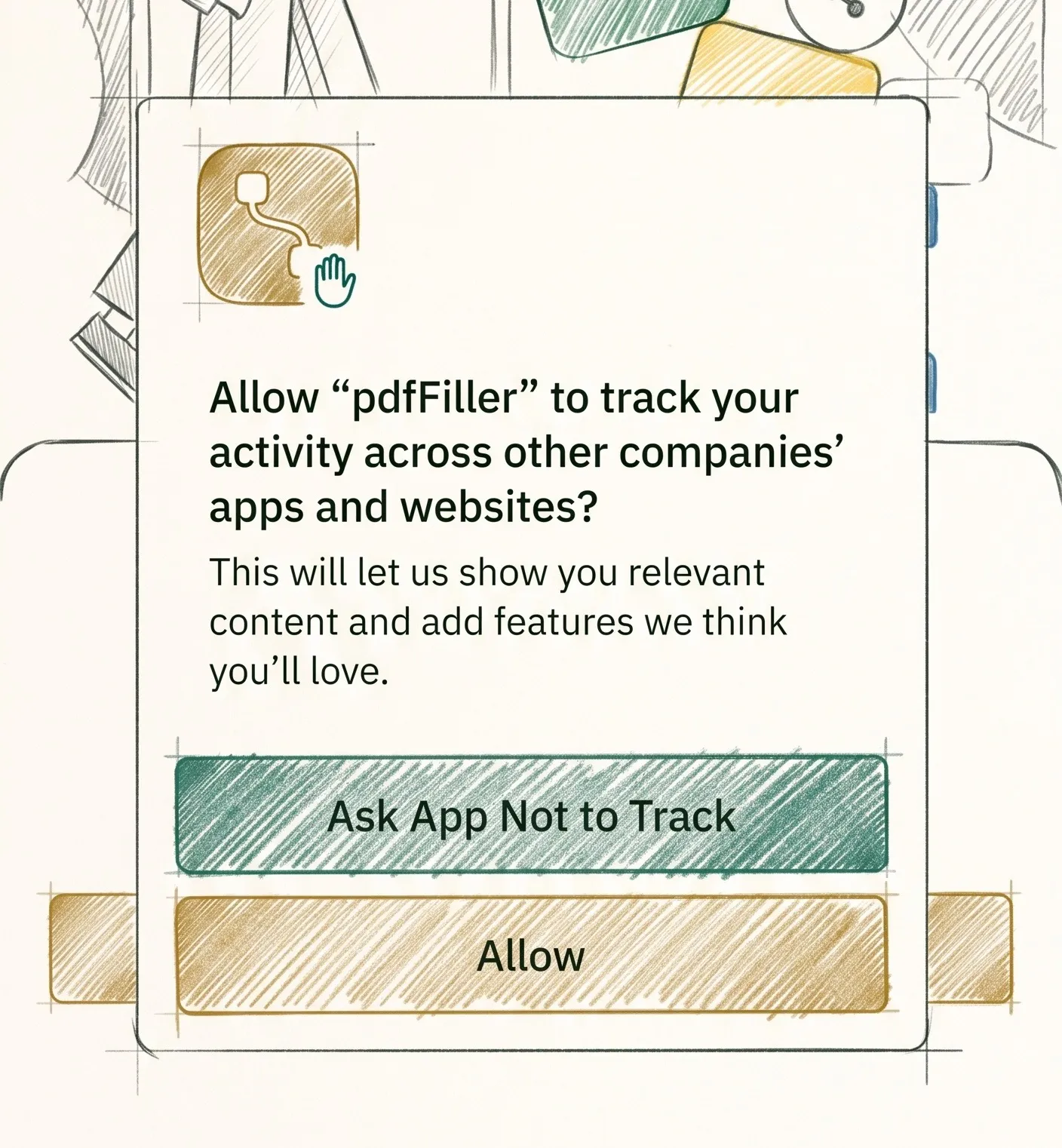
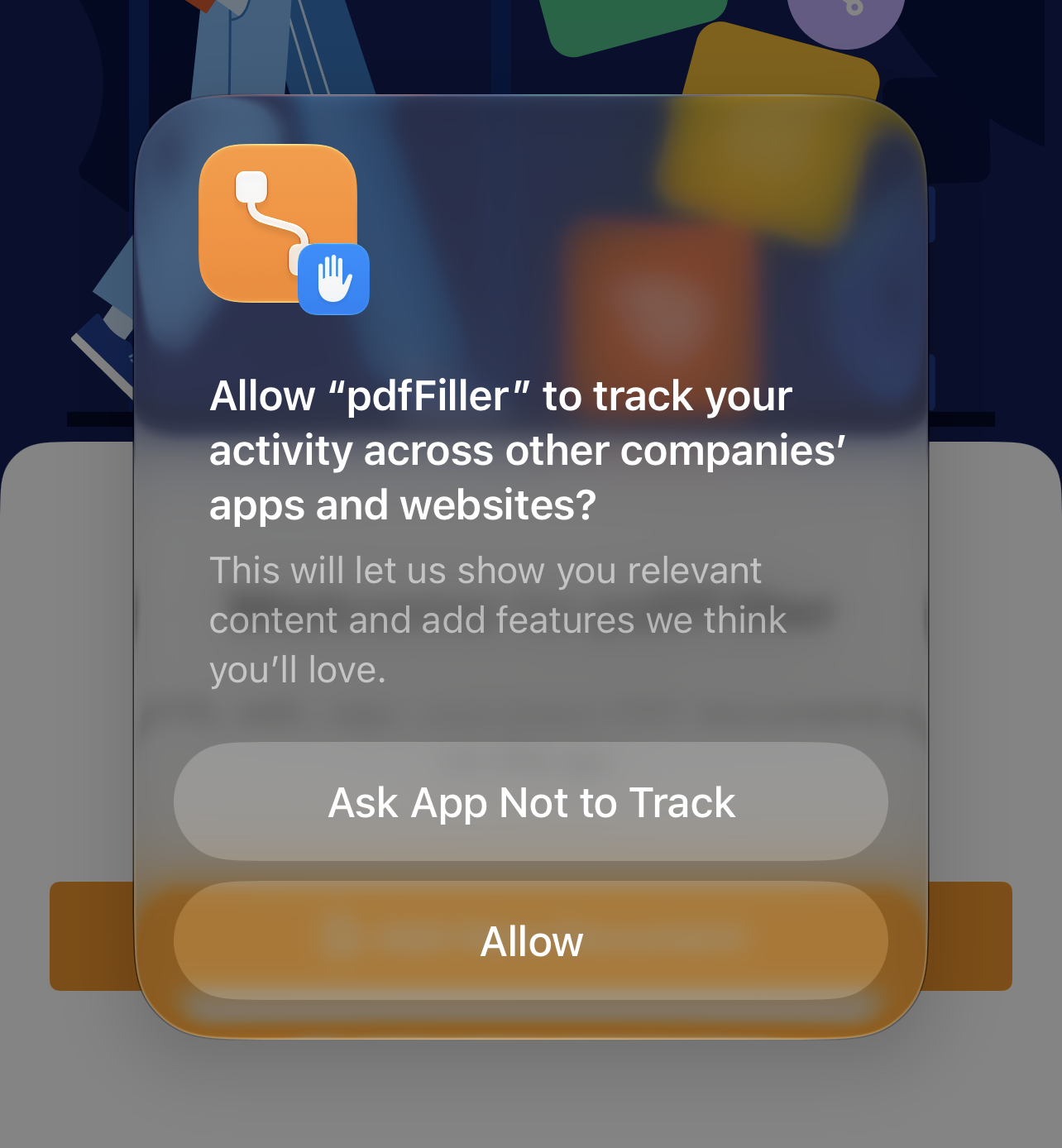
ATT (App Tracking Transparency) is a window from iOS itself, which you most often see on the first launch of a freshly downloaded app. The text can be edited, but the point is the same: the device asks permission whether this app can track the user in other apps and on other websites. For us as web analysts, the closest thing from the web world is a cookie banner in opt-in mode (like in Europe), but with three important differences:
- The answer decides whether the device will be given the advertising ID (IDFA);
- This window isn’t rendered by the site, and not even by the app, but by iOS itself;
- In a cookie banner you can give partial consent. Here it’s either full permission or full denial
The tears started flowing with the release of iOS 14.5 - without ATT consent, instead of real IDFAs the app started getting nothing but zeros, and all the attribution that relied on this ID went down the drain.
What a person sees and what they can answer
By default, the app (meaning its developers) shows this window somewhere right after the app’s first launch. All the developers get to do is influence the text in the window explaining why tracking is needed. Everything else is up to the operating system (not even the app). There are two buttons, so the answer really is binary: allowed - the app gets the IDFA, denied - zeros. But the system has four states, because there may be no answer at all:
- Allowed - the app gets the advertising ID;
- Denied - zeros;
- Not determined - the state when the banner hasn’t been shown yet or the OS closed the banner by itself without an answer (when the latter happens, honestly, I don’t know);
- Restricted - a full ban on tracking is set on the device level (in settings).
There are certain rules dictated by regulations, for example, you can’t block access to the app’s functionality for denying on the banner. Developers are allowed to put their own explainer screen before the system window, but only an explanation, honest and neutral, not an incentive to tap the consent button. If it’s Europe, after an explicit denial you can show the banner to the user again no earlier than a year later.
How many people consent to tracking? Different numbers float around the internet, but you can definitely say that most people still hit deny. And, as with cookie banners, you can fight for the consent rate: you can show the ATT window at any point in the user journey, and Apple itself advises not to ask right at launch. So developers test showing it after some positive event in the app, for example, after the congrats on finishing the first level of a game, or when the person has already gotten some value from the app. There’s no single answer here: according to AppsFlyer, consent is highest exactly on the first launch. One rule stays the same - Apple forbids offering something in exchange for “allow”.
And what about Android?
Android has no strict mechanism like ATT: there’s no consent like the iOS one, and the advertising ID (GAID, Google Advertising ID) is available by default. Yes, the user can deliberately reset or delete it in the device settings - then zeros get substituted too - but that’s extra fuss, and few people bother with it. In “web analytics” terms it’s like a cookie banner in Europe (iOS) versus America: in the first case you can’t by default, in the second you can, but with the option to opt out. So tracking and attribution on Android aren’t such a big problem for marketers, and that’s exactly why the main focus in this article (and in the market as a whole) is on iOS. Especially since it’s commonly believed that iPhone owners on average have more money to spend than a regular Android user.
Why it’s a hit to the stats first of all
If you read between the lines and think through what’s written, ATT with the release of iOS 14.5 broke not only “who gets the install”. It broke the business decisions that relied on it: which campaigns make money and which don’t; where to move budget or which channel to turn off altogether. It’s not only attribution that broke, the numbers themselves went off too. In the so-called post-ATT era every number in a report is already an estimate that you have to derive in direct and indirect ways, not a solid fact. And that’s why all of mobile attribution is so complex and interesting. You’ll definitely never have this many hoops to jump through on the web, in the form of SKAN and vendor-specific tools (like ODM & ICM from Google). Just like there’ll never be exact numbers. Are right decisions possible in these conditions? Yes, but for me that’s still pro level for now.
And another pro-level thing is to understand and think through the whole path from A to Z. The next section is exactly about that. In my opinion - the absolute basics, very complex in concept, but it closes a bunch of questions at once. If you only knew how long I waded through that swamp… So I’ll save you a bit of time. Enjoy.
The path of one install: from impression to report
Let me repeat a bit for the web. A person clicks an ad (it doesn’t matter, in
search results or on a website), goes to the site, analytics records
page_location & page_referrer, a click ID (and / or a set of UTMs) is
recorded, and source / medium is calculated by attribution rules.
In mobile, between the impression and the first app launch stands the App Store, which passes nothing further. The exception is Apple Search Ads, but there attribution comes from iOS itself, not from the store. Through the user’s eyes, at first glance, the path looks similar (except that on the web there’s no store): saw an ad, went to the App Store, downloaded the app. But the under-the-hood story is way more tangled.
The first fork is what type of ad the person came from. Options:
- Ad networks with an attribution link
- So-called Self-Reporting Networks
The second fork in the logic comes from whether the user gave ATT consent in both apps - the one where the ad was shown and the one being advertised. Separately from this, SKAdNetwork runs as a parallel flow - Apple’s own mechanism that doesn’t depend on the MMP or on ATT consent / non-consent. On the diagrams below these are steps 1, 6, 10.
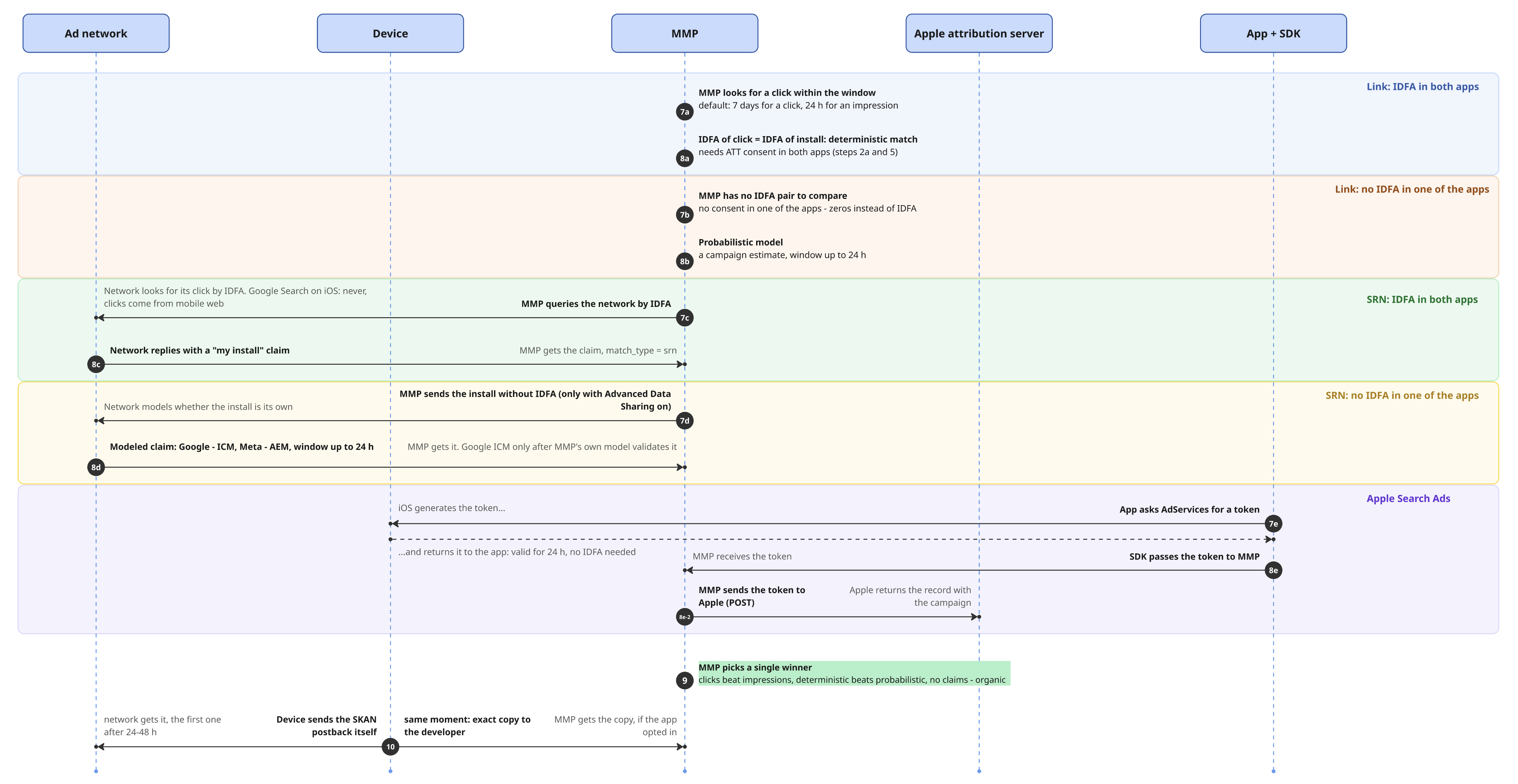
Below are two diagrams I drew: before the install and after. Steps are numbered in sequence. Where there are forks, I mark them with colors and add letters to the numbering. How to read them: first open the image at full size (click it), then go top to bottom and left to right, following the step numbers.
Before the install
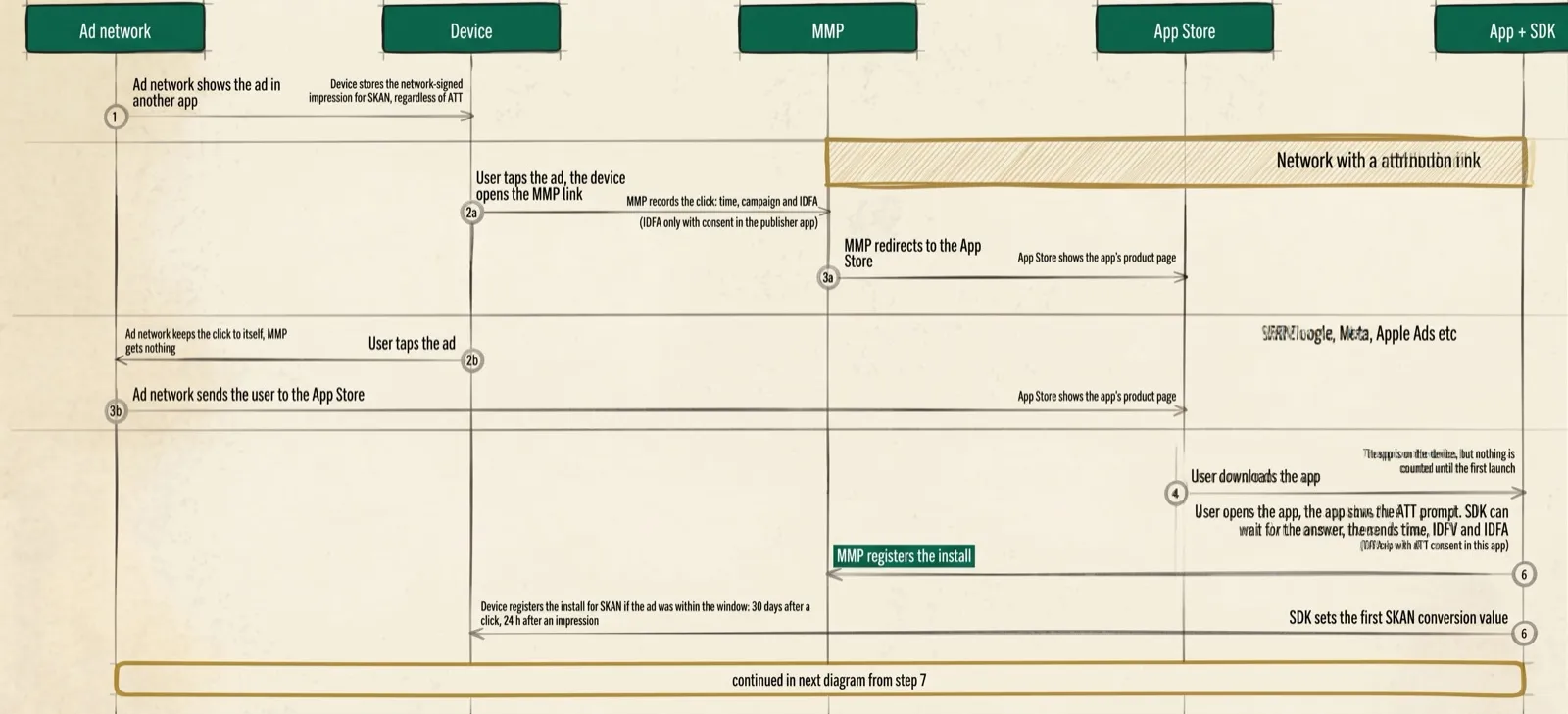
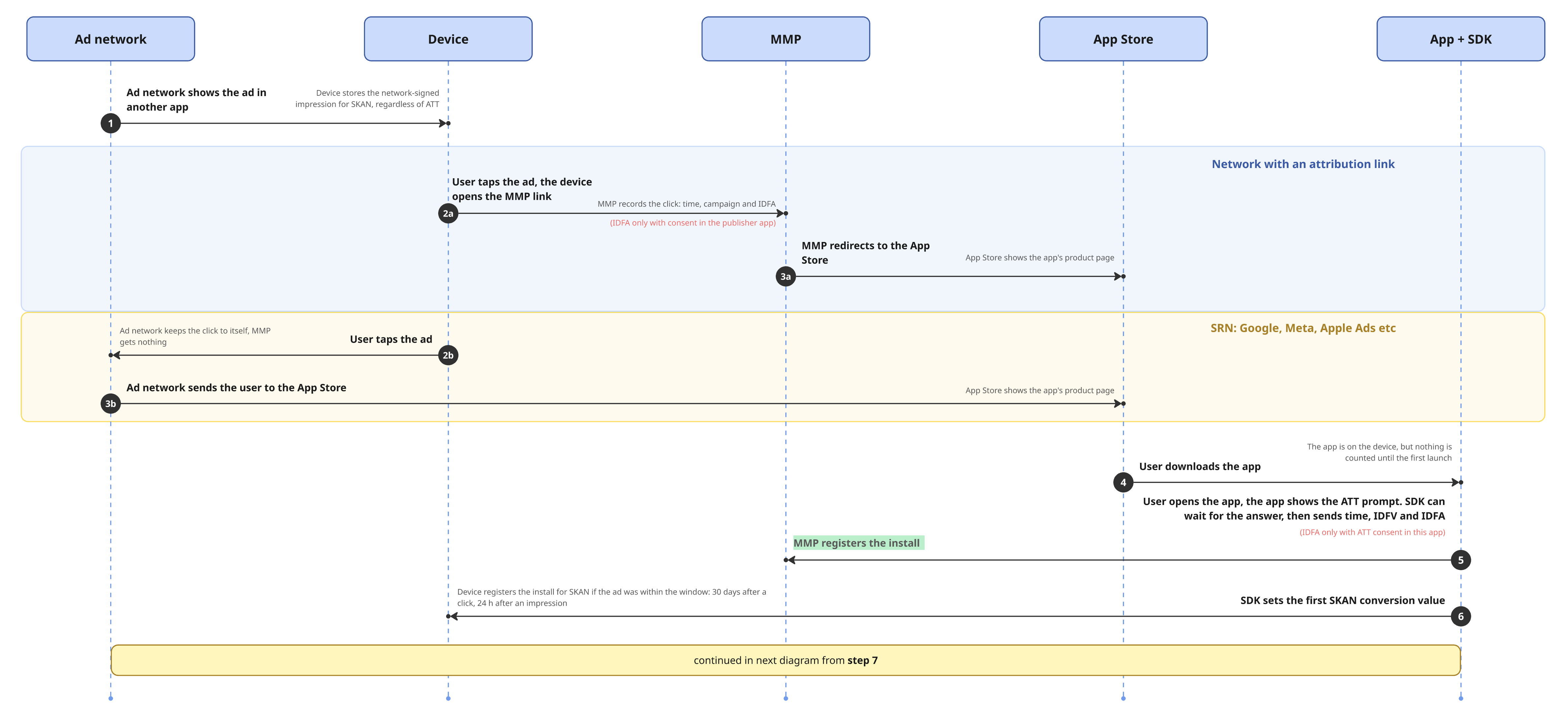
Step 1. A network (doesn’t matter, SRN / non-SRN) shows an ad in someone else’s app (YouTube, Facebook, Instagram are apps too) or on a website in Safari. If the network signed the ad for SKAN, the device records the impression right away.
Step 2a-3a. non-SRN (a network with an attribution link). The user clicks the ad, and the click goes through a redirect via the attribution link. At this moment your MMP records the click info on its side (including the IDFA, if the user gave ATT consent in the “publisher” app) and redirects the person to the App Store page to download. It can also go differently - there’s no redirect via the attribution link, but the ad system reports the click to, say, AppsFlyer by itself. The result is the same - the MMP learns where the impression or click came from.
Step 2b-3b. SRN (Google Ads, Meta Ads, TikTok Ads, Snap etc). The click stays inside the ad system itself, and at this stage NOTHING is passed to the MMP. The ad sends the user straight to the App Store page
Step 4. The user downloads the app. The download, as an event, isn’t counted anywhere until the app is opened for the first time.
Step 5. The app opens for the first time - the MMP SDK launches for the first time, and exactly this event counts as the install. The SDK in the app sends the MMP server a timestamp, IDFV & IDFA (the latter only with consent in the ATT banner).
Step 6. In parallel with the app launch, the SDK sets the first conversion value = 0 for SKAN. Usually 0 is exactly the install.
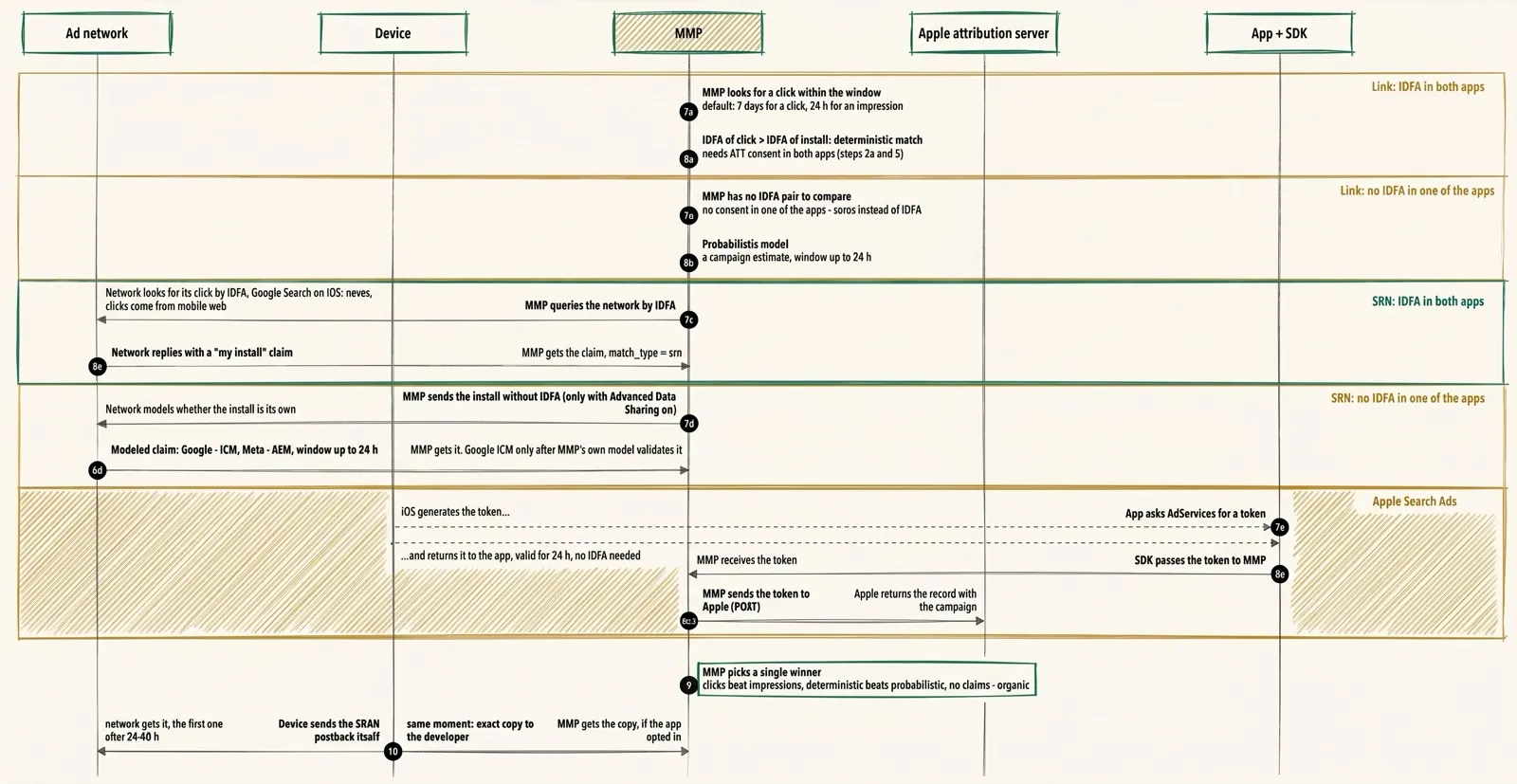
Next (on the next diagram) the MMP has to figure out who gets this install. There are 5 possible scenarios, but only one happens:
- Step 7a-8a - network with an attribution link, IDFA on both sides;
- Step 7b-8b - network with an attribution link, no IDFA on at least one side;
- Step 7c-8c - SRN, IDFA on both sides;
- Step 7d-8d - SRN, no IDFA on at least one side;
- Step 7e-8e-8e2 - Apple Search Ads
Network with an attribution link
Step 7a-8a. non-SRNs, IDFA on both sides (from the app where the ad was seen, and in the app that was advertised and just installed). The MMP searches among all its clicks (7-day window) and impressions (1-day window). The search goes by IDFA - on the previous diagram it came with the click on the ad on step 2a, and on step 5 - at the moment of the first app launch. If they match (and they should, because the IDFA is the same for all apps on a device), it’s a deterministic (exact) match. An exact match is the best case for marketers (but such matches are the minority).
Step 7b-8b. There’s no advertising ID on at least one side. Zeros instead of the IDFA on one side are enough, and there won’t be an exact match. Then the probabilistic model comes into play, with a window of up to 24 hours (the MMP tries to match by IP + click and install timestamps) - the same “gray area” the whole mobile attribution market stands on.
Self-attributing network: Google, Meta etc
With an SRN you also need two consents - in the app where the ad was shown, and in the app being advertised. The difference here is that most often the “publishers” themselves are the apps of these ad systems.
- Meta shows the ATT window in Facebook and Instagram. Until the person answers, the system assumes tracking is denied. So on a click on an ad in these apps the IDFA won’t be passed.
- Google, interestingly, doesn’t show the ATT window in its iOS apps at all, and doesn’t pass the IDFA. The exception is ads in the YouTube app. It’s the only Google app with an ATT banner.
- Google Search on iOS isn’t attributed by device ID at all - neither in the browser nor in the Google app. In the browser there’s no IDFA at all: it’s an identifier for apps only. And the Google Search app doesn’t show the ATT window
Step 7c-8c. SRN, IDFA on both sides. AppsFlyer, say, asks all the self-attributing ad systems it has an integration with whether they happened to have a click with such-and-such IDFA. The network that found this IDFA on its side answers “this is my install”. In this case the MMP attributes the install to exactly this network.
Step 7d-8d. SRN, no IDFA on at least one side. The cases here:
- ATT consent wasn’t given in your app, meaning there’s no IDFA on your side. Here the MMP has nothing to go to the integrated ad systems with, and everything is decided by the Advanced Data Sharing toggle. If it’s off, AppsFlyer or whoever won’t even ask a specific ad system about this install. If it’s on, it’ll ask using the rest of the info, but not by IDFA (it’s just zeros).
- The IDFA is on your side, but not on the ad system’s side (a denial in the app where the ad was clicked). Here the MMP looks for the click owner by IDFA, but the owner won’t be found, because the IDFA wasn’t recorded on that side.
In both cases the ad system can send the answer “this is my click” based on its own probabilistic model. But every vendor has its own technology: at Google it’s ICM, at Meta - AEM. More on this in the section about layers.
Apple Search Ads, as an exception
Nominally it’s also a Self-Reporting Network, but with a very significant benefit, since it shares one ecosystem with the App Store. For full exact attribution this channel doesn’t need the IDFA at all.
Step 7e. The mobile app asks the AdServices framework for a special token, and iOS issues it right on the device. It’s valid for 24 hours.
Steps 8e, 8e2. The SDK passes the token to the MMP, and the MMP sends it to Apple’s attribution server and gets back a record with info on which campaign brought this install.
Who decides who gets the credit
Step 9. There can be several so-called claims on one install, from everyone at once: Google, Meta, some small ad partners with an attribution link… But the MMP has to pick only one winner. The rules are:
- A click matters more than an impression
- An exact match beats a probabilistic one
- The click timestamp closest to the install wins
If nobody claims ownership of the install, it’s counted as organic. Here, unlike on the web, it’s an orphan, closer to (direct) / (none). So an organic install is an install you can’t credit to any known source.
SKAN - parallel to everything
SKAN is like an independent auditor, it lives its own life and on the diagrams above goes through three steps:
Step 1. On an iPhone or iPad, at the moment the ad is shown in the “publisher” app, the ad network signs the impression, and SKAN stores this signature on the device. The info about the signature doesn’t leave your operating system. And, very importantly, SKAN doesn’t care at all whether the “publisher” side passed an IDFA.
Step 6. At the first launch after the install, the SDK makes a Conversion Value write call and this way registers the install in SKAdNetwork, if no more than 30 days passed from the click to the install, or 24 hours from the impression or 24 hours from the moment of the impression. The first SKAD window opens, but until it closes, the data from your device doesn’t go anywhere.
Step 10. After the first window closes, iOS sends a postback to the ad network (with a random delay of 24-48 hours) by the signature from Step 1, bypassing the MMP and Apple’s servers - from the device straight to, say, Google or Meta. In parallel, there’s an option to send a copy of the postback to the developer. That way SKAN data also gets into the MMP.
Overall, SKAdNetwork is a super important topic for mobile attribution and definitely deserves a separate article. I hope I’ll get around to it someday, and it might even be soon.
Basically, that’s it for the basics of mobile attribution. The thing to understand - an exact match of a click and an install is only possible if the IDFA advertising ID is there on both sides. The rest of the installs have to be attributed by detours - the networks’ own probabilistic models (ICM, AEM) and your MMP’s own model + hoping for aggregated data from SKAN. None of the options closes the question 100%, so in practice they get stacked in layers. More on these layers next.
What patches the loss of IDFA: 3 layers
After ATT the market (MMPs and ad systems) adapts and finds its workarounds. Deterministic match is still there, same as it was, but it’s the minority compared to probabilistic match, which keeps improving and growing new tools like ICM & AEM. Next is a table of three layers. Two of them are user level, the third (SKAN) is aggregation by campaign.
| Layer | When it kicks in | What we get |
|---|---|---|
| 1. Exact match | there’s IDFA on both sides: ATT consent both in the app where the ad was shown and in the one being advertised or it’s Apple Search Ads - a token is enough there |
user-level: we see every user and all their events |
| 2. Modeled match | no IDFA on at least one side network with a link - the MMP’s model counts SRN - the network sends the claim: ICM at Google, AEM at Meta |
also user-level, but modeled: match_type = probabilistic. Needs Advanced Data Sharing, IP without masking, IDFV in every event, fresh AppsFlyer and Firebase SDKs |
| 3. Campaign aggregate | always, regardless of ATT: if the network signed the impression for SKAN | campaign-level: only the install count and conversion value per campaign, with a delay |
Exact match - it’s all clear there, IDFA on both sides (the first step). The second data layer is probabilistic matching, when the IDFA is on one of the sides or not there at all. And here everything depends on the network type. If it’s a network with an attribution link, the MMP’s own probabilistic model works. If there’s an SRN on the other side, like Google or Facebook, their own model works on these vendors’ side and decides by itself whether it’s their install. If yes, the network submits a claim to the MMP, and the MMP then decides whether to accept it. How exactly these models are tuned, nobody knows except the vendors themselves.
The third layer is aggregates from SKAdNetwork. Let me remind you that consent isn’t needed here, but you won’t get user-level data either - only campaign level, and the granularity of this data will depend on certain thresholds. All of this, as I promised, will be in a separate article.
A separate option, in one form or another, is enrichment with personal data (email or phone) for ad networks. For this, Advanced Matching Data Sharing has to be turned on in the integration with the specific network (not to be confused with Advanced Data Sharing - the names are very similar). Worth noting that this doesn’t affect your MMP’s attribution results (you won’t get more claims from Google and won’t shrink the volume of organic this way).
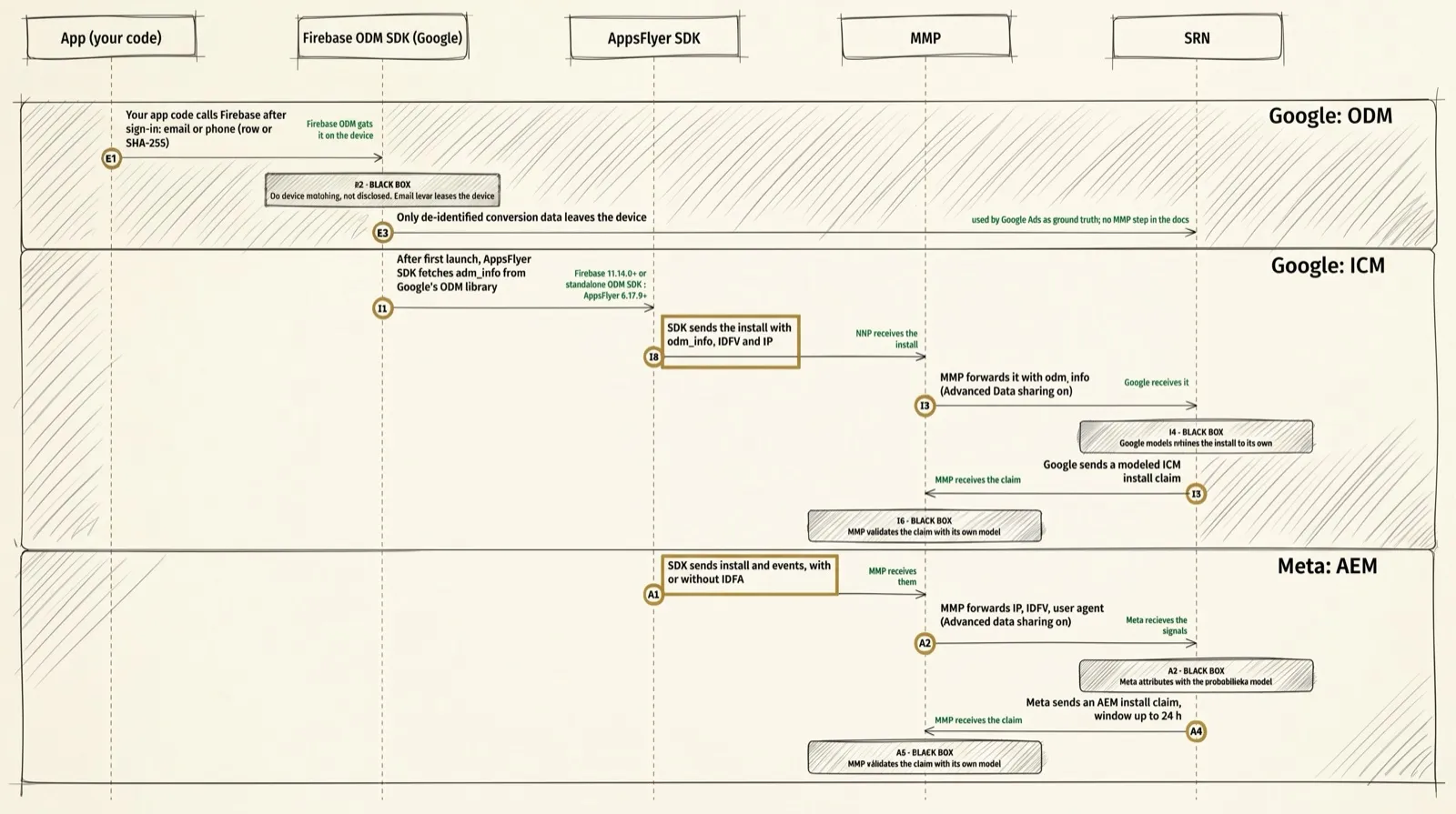
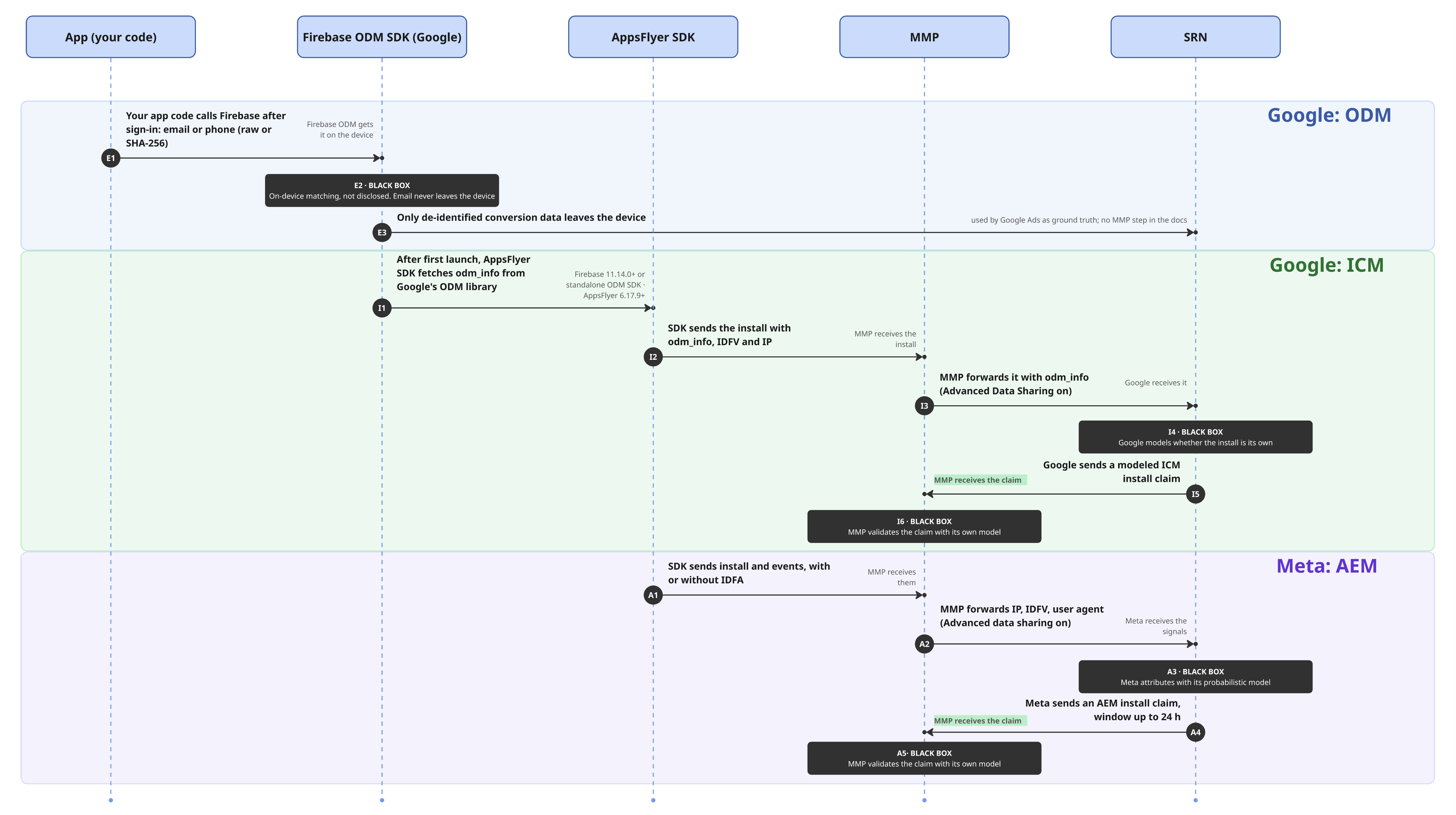
The second layer raises the most questions. Exact match and SKAN work by clear rules, but how Google and Meta decide that an install is theirs when there’s no IDFA, they don’t say publicly. You can only see what data goes to them and what comes back. Here’s how it looks schematically.
Google: ODM & ICM
ODM (OnDevice Measurement) literally means measurement on the device. It comes in two kinds, and each one has different goals.
The point of the first is passing the email to the Firebase SDK after the user signs up in your app (E1-E3). The match is looked for right on the phone. What goes out to Google is only anonymized data on whether there really was a conversion. Basically, this works to increase conversions in Google Ads for UAC campaigns.
The point of the second kind is anonymized event data (I1-I6), and this is
exactly what ICM (Integrated Conversion Measurement) runs on. It’s enough to
have an up-to-date Firebase SDK + a link between the relevant GA4 property and
the Google Ads account. After the first launch, the AppsFlyer SDK itself takes
the odm_info string from Firebase and sends it together with the install.
Then, if Advanced Data Sharing is on in the Google integration, AppsFlyer passes
Google the install event together with odm_info, IDFV, IP and user agent,
Google decides with its model whether it’s its install, and sends a claim. And
AppsFlyer checks it with its own model.
What you get is more installs attributed to Google on the AppsFlyer side (in
AppsFlyer’s raw data match_type will be = probabilistic). That is, the organic
share shrinks in Google’s favor, and the gap between event counts in the MMP and
in the ad account gets smaller.
An important nuance - neither technology works in the EEA + the UK and Switzerland.
Meta: AEM
AEM (Aggregated Event Measurement) is the technology Meta uses to count
installs and events of people who didn’t give ATT consent. If you look at the
diagram, Meta does the same thing step by step as Google (or rather the other
way around: AEM appeared before ICM). The main difference is at the start:
there’s no tie to the email and odm_info.
If Advanced Data Sharing is on in the Meta integration in AppsFlyer, installs are passed without the IDFA, but with IDFV, IP and user agent (A1-A2), so here it’s actually the same as ICM. The IP can’t be masked (an option on the MMP side) - otherwise the events won’t qualify for AEM. Then Meta decides whether this install belongs to it (A3), and if yes, it sends a claim to AppsFlyer by last click, with a window of up to 24 hours (A4). But whether AppsFlyer checks these claims with its model, like in Google’s case, isn’t disclosed (A5).
Both AEM and ICM are basically similar technologies + a certain black box in each. Both deliver claims to the MMP almost in real time. The difference is in the ad account itself: Meta, on the same AEM signals, shows reports in Ads Manager and trains the ads, while Google doesn’t show ICM claims in its ad account - it has its own modeled conversions there, which keep getting filled in for up to five days.
How to bring the layers together
Easy - in the MMP, it’s one of its core things. If you just add up classic attribution (everything you can match on user level) and SKAN (campaign-level aggregation), we’ll get more than there actually is: SKAN is a parallel flow, and the same install can also have a deterministic match, so some installs can get counted twice.
In AppsFlyer there’s SSOT (Single Source of Truth) for this. It brings both flows to a campaign-level aggregate (as a common denominator) and removes duplicates. An install that both of them saw is counted once, by classic attribution, and one that’s only in SKAN is added on top.
This has a price - one bit out of six in the conversion value for SKAN. That is, if without the SSOT flag you can pack in 64 values (from 0 to 63), the ability to do this kind of dedup will cost you 2 to the fifth power (32) - exactly half of the 64 values. The flag is set by the AppsFlyer SDK itself - right on the phone, on first launch, if attribution worked out. But how it learns the attribution result when there’s no IDFA is a black box. And why be surprised - it’s mobile tracking ¯\_(ツ)_/¯
Conclusion
The world of mobile tracking and marketing always left a bunch of unclear things in my head. Something you kind of understand, something you feel, but are your surface-level conclusions right? Hard to judge when the priority at work is still fully on the web side.
On the web, basically, everything is deterministic (if you leave adblockers and
consent denials out of it). Attribution there is basically free: it’s enough to
know page_location & page_referrer, and you can calculate the traffic source
yourself. That’s why for a long time I didn’t get what exactly systems like
AppsFlyer rake in such money for. Because I didn’t understand how hard the
process is to figure out who brought the user to the install. Because on the web
there are no such things as polling all the SRNs, decoding postbacks from SKAN,
putting deterministic users and aggregates from Apple together, and in the end,
figuring out who gets the install and why.
So the answer to the question “Where’s the truth?” from the start of the article: it’s not in the middle - the MMP should be the truth, because it’s the arbiter that tries to bring players like Google and Meta under one common set of counting rules. If your truth isn’t heading toward the MMP data, that’s a question to your mobile tracking.
And the MMP is also a bridge to product data. Joining users from classic attribution to product data, with a correction for the SKAN aggregate, is quite possible. So no matter how big the temptation to calculate CAC from Google or Meta conversions, it’s more correct to calculate it from the events of AppsFlyer and similar services.
Deterministic users are the minority, the rest is models.
If I compare mobile with the web, I see a parallel with algebra and geometry. If you know the algorithm, the formulas and the arithmetic, you’ll most likely get to the answer. In geometry clear instructions aren’t enough - you have to think, look from different sides, analyze. That’s why, as I see it, specialists who really get mobile tracking, analytics and marketing as a whole are few and far between, and everyone who’s mastered mobile attribution on the level of understanding, and all these scary abbreviations, is worth their weight in gold.
Separately, I want to thank myself for taking on this article, and especially for drawing these three diagrams. Honestly, I’d have given a lot for a knowledge digest like this at the start, when I’d just begun touching mobile apps. With this article I’ve opened a new series that genuinely drives me, and judging by how many questions it closed for me personally, there’s more to come. If you’re now where I was at the start, I hope this map saves you a few weeks of wandering.